1 min

How to start tracking WBT on CoinMarketCap and CoinGecko?

How to start tracking WBT on CoinMarketCap and CoinGecko?

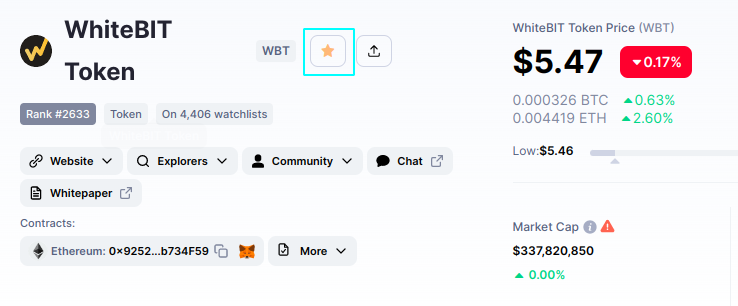
If you want to add WBT to the Watchlist on CoinMarketCap, then:

  • go to the WBT page on the website;
  • click on the star near the WBT ticker and select Add to Main Watchlist.
It’s almost the same for CoinGecko:

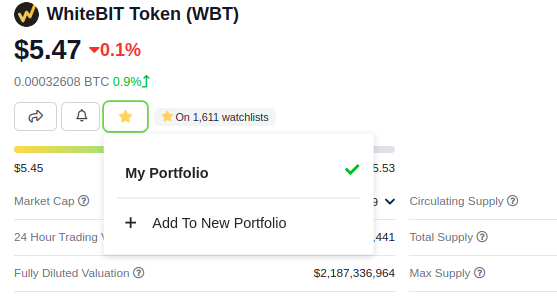
  • go to the WBT page on the website;
  • click on the star near the WBT ticker and choose My Portfolio.
That’s it!

To Share
Published by
Author: WhiteBIT AU WhiteBIT AU

Recent Articles

What Is a Crypto Airdrop

Trading, mining, and staking are common ways to earn money in the crypto market. However, crypto airdrop ...

What is Pump and Dump in Cryptocurrency?

In recent months, the cryptocurrency market has experienced a surge in the popularity of meme coins, over...

What Is Phishing in Crypto and How to Protect Yourself

Phishing attacks are a growing concern in the cryptocurrency space, as hackers target users with sophisti...

What is a cryptocurrency, and how does it work?

The cryptocurrency market can both fall and rise. It is now obvious that blockchain technology and digita...

How to Make a Cryptocurrency Wallet?

In the previous guide, we thoroughly studied the different types of crypto wallets and discovered the imp...

More news

Go to the section
What is Delegated Proof-of-Stake?

In a recent collaborative article, we explored the Solar (SXP) project in-depth, providing insights into ...

What is DeFi and how does it work?

DeFi is a financial technology based on secure distributed ledgers, an environment that enables the use o...

What Is Etherscan and How to Use It

Sent a token on the Ethereum network and it hasn’t shown up yet? Wondering if something’s wrong with your...

What Is A Seed Phrase And Why Is It Important?

Sooner or later, every cryptocurrency owner will encounter the concept of a “seed phrase.” Ho...

What is TGE in Cryptocurrency: All about Token Generation Event

In the dynamic realm of cryptocurrencies, relentless innovation gives rise to novel concepts, with the To...